书接上回:GoAgentX 架构深度解析(二):AHP — 多智能体的通信基石
系列第三篇来了,首先还是进行一些废话
你用过那种 chatbot 吗?聊了 50 轮之后它开始胡言乱语,因为 context window 被塞爆了。
更气人的是,它刚帮你解决完一个问题,下次遇到类似的——它又从头开始推理。
我当时就在想:遇事不决加中间层,一层不够,继续加,那么搞个词频分析试试?
于是就有了第一版踩坑,狠狠踩,猛猛踩
一、词频分析:第一个直觉
先聊聊我走偏的那段路。
解决"记忆爆炸"有很多种走法,我最先想到的不是什么三层架构,而是词频分析。思路很朴素:
把 Agent 的对话历史拆成词,统计哪些词出现最多。高频词 = 这个话题经常出现 = 值得记住。
这很直觉对吧?人总结经验不也是这么干的——“用户最近老问数据库慢的问题,那这个应该是高频经验”。我当时撸了一个极度简单的版本:
type KeywordExtractor struct {
    stopwords map[string]bool  // "的"、"了"、"是"、"好的"、"谢谢"……
}

func (e *KeywordExtractor) Extract(ctx context.Context, messages []Message) ([]Keyword, error) {
    freq := make(map[string]int)
    for _, msg := range messages {
        for _, word := range tokenize(msg.Content) {
            if !e.stopwords[word] {
                freq[word]++
            }
        }
    }

    // 按频率排序取 top-K
    var keywords []Keyword
    for word, count := range freq {
        keywords = append(keywords, Keyword{Word: word, Freq: count})
    }
    sort.Slice(keywords, func(i, j int) bool {
        return keywords[i].Freq > keywords[j].Freq
    })
    if len(keywords) > 10 {
        keywords = keywords[:10]
    }
    return keywords, nil
}
这段代码现在看很蠢,但当时觉得挺美——O(n) 扫一遍就行,一个 map[string]int 搞定,不需要 LLM,不需要数据库,甚至不需要网络请求。在项目早期那个"先跑起来再说"的阶段,这种简单粗暴的方案简直太诱人了。
但跑了一段时间之后,问题全暴露了。
高频 ≠ 重要
词频统计只看"出现次数"。Agent 对话里出现最多的永远是这些:
"你好" -> 每一轮的开场白

"好的" -> 用户的确认回复

"谢谢" -> 结束语

"不好意思,我没理解你的意图" -> 小伙还怪有礼貌的嘞
即使加了停用词表过滤,真正有价值的概念——比如"数据库连接池"、“索引优化”、“查询超时”——出现频率比"好的"低一个数量级。你只能知道"哪些词经常出现",没法知道"用户遇到了什么问题、Agent 怎么解决的"。
丢失语义结构
词频把对话拍平成一个词袋,原始对话的"问题→解决方案"对应关系全丢了:
用户:"数据库查询超时了"

Agent:"检查了索引,发现缺少联合索引,已创建"

词频告诉你:

"数据库"×2 -> "查询"×1 -> "超时"×1 -> "索引"×2 -> "检查"×1 -> "创建"×1

但你不知道:

"数据库查询超时"是问题

"缺少联合索引"是原因

"已创建"是解决方案
一条对话最值钱的部分——"用户遇到了什么 → Agent 做了什么"的因果关系——被词袋模型彻底抹平了。而这是经验复用的核心:需要知道"缺索引导致超时,建联合索引解决了",不是"索引这个词出现了两次"。
无法支持语义检索
词频方案最致命的限制:你没法用自然语言语义去检索。
用户新问:“数据库又慢了,有啥办法?”
词频匹配的逻辑是:拆词 → 找共同高频词 → 打分。"数据库"匹配上了,“慢” vs "超时"匹配不上,因为词面不同。技术上可以用 Word2Vec 做词向量扩展,但训练成本和维护成本比直接上 LLM embedding 高几倍——用词频做检索,本质上是在用朴素贝叶斯做语义理解,天花板太低。
教训
词频分析这条路走不通,核心原因就一句话:Agent 记忆要解决的不是"哪些词出现过",而是"哪些经验值得复用"。
这两个问题差了一个维度。前者是统计问题,后者是语义问题。用统计工具解决语义问题,就像用菜刀拧螺丝——不是不能干,但拧完螺丝也废了。
所以我才回到基本面重新想:一个 Agent 到底需要记住什么?
二、先说说痛点
我自己跑 Agent 的时候最先碰到的不是"不够聪明"的问题——是记忆爆炸。
一个 Agent 跑了几小时,会话历史好几千条消息。全塞进 LLM 的 context 里?1M 上下文是给你干这个用的吗?Token 烧得飞快不说,响应也越来越慢,到后面基本没法用了。
比如说这个,没有好的上下文管理,拿到了后期简直是神仙打架
但最让我烦的不是这个。最烦的是:Agent 刚解决完一个问题,下次遇到类似的又要从头推理。
你经历过这些场景吗?
-
上下文膨胀:聊了 50 轮,prompt 里塞满了历史,Token 消耗暴涨,响应慢得像蜗牛
-
经验无法复用:刚修完一个复杂的 bug,下个用户问类似的——Agent 又从零开始推理
-
崩溃失忆:Agent 挂了自动重启,用户问"刚才分析到哪了?",Agent:

-
检索噪声:把所有对话一股脑向量化存进数据库,召回的全是不相关的旧聊天记录
我当时就想:不能这样搞。Agent 需要记住的不是对话本身,而是从对话里提炼出来的经验。于是就有了 Memory Distillation——记忆蒸馏。
三、三层记忆架构
整个记忆系统的核心是一套三层架构,每一层都比上一层更精炼、更持久、更昂贵:
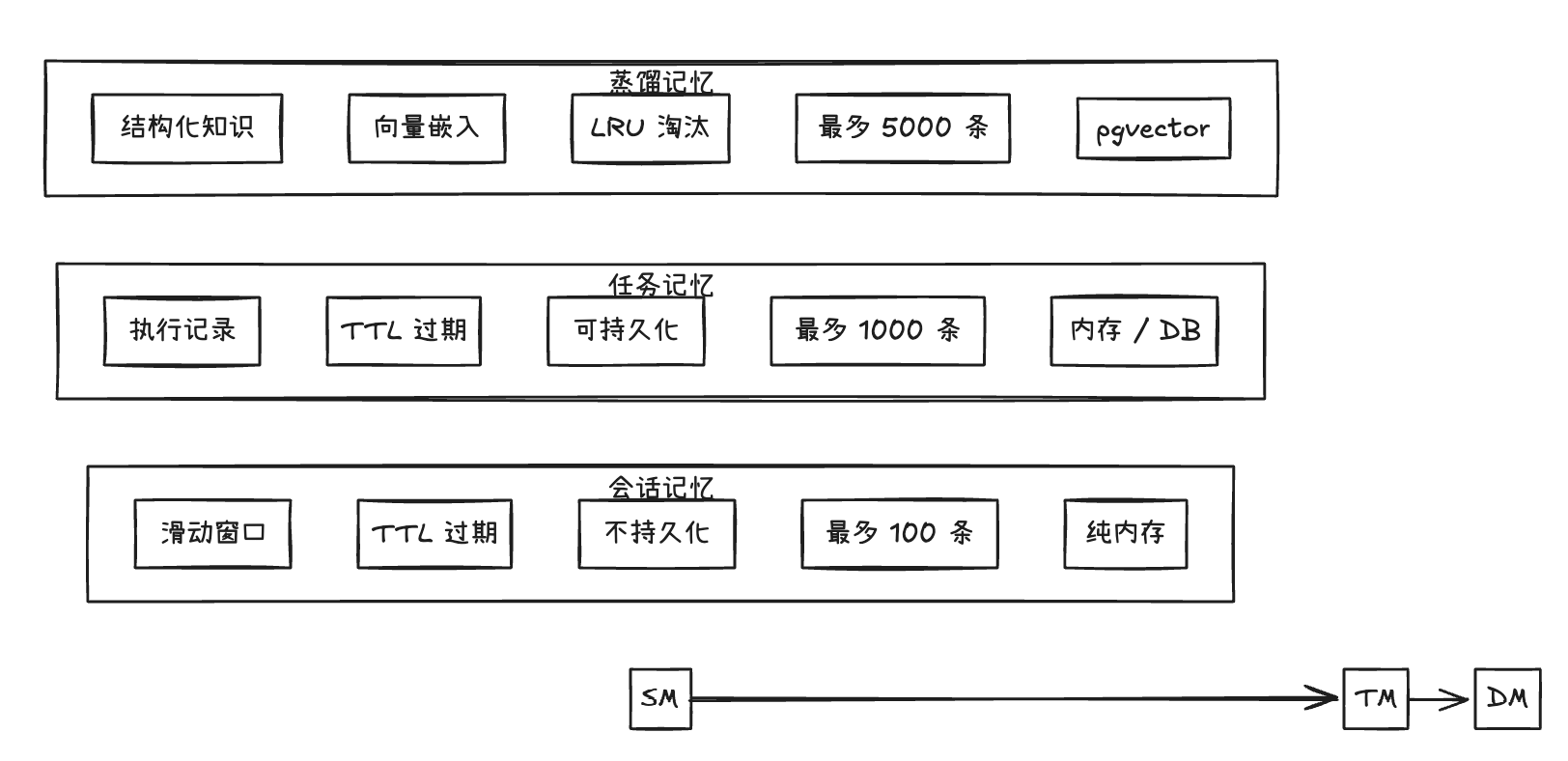
设计哲学:不是所有数据都需要蒸馏,也不是所有经验都需要向量化。
这三层解决了不同的问题:
-
Session Memory:当前对话上下文。等价于人的"短期工作记忆",用完即弃
-
Task Memory:单次执行记录。记住 Agent 执行了哪些任务、输入输出是什么
-
Distilled Memory:可复用的经验。从任务中提炼出"问题→解决方案"的结构化知识
每一层都在做「变少、变精、变持久」的转换。
四、MemoryManager 接口:统一抽象
三层记忆功能被抽象为 MemoryManager 接口,定义在 internal/memory/manager.go:
type MemoryManager interface {
    // ── 会话层 ──
    CreateSession(ctx context.Context, userID string) (string, error)
    AddMessage(ctx context.Context, sessionID, role, content string) error
    GetMessages(ctx context.Context, sessionID string) ([]Message, error)
    DeleteSession(ctx context.Context, sessionID string) error
    BuildContext(ctx context.Context, input, sessionID string) (string, error)

    // ── 任务层 ──
    CreateTask(ctx context.Context, sessionID, userID, input string) (string, error)
    UpdateTaskOutput(ctx context.Context, taskID, output string) error
    DistillTask(ctx context.Context, taskID string) (*models.Task, error)

    // ── 经验层 ──
    StoreDistilledTask(ctx context.Context, taskID string, distilled *models.Task) error
    SearchSimilarTasks(ctx context.Context, query string, limit int) ([]*models.Task, error)

    // ── 生命周期 ──
    Start(ctx context.Context) error
    Stop(ctx context.Context) error
    SetEventStore(store events.EventStore, streamID string)
}
这个接口的设计有几个值得注意的点:
分层清晰:CreateSession/AddMessage/GetMessages 操作会话,CreateTask/UpdateTaskOutput 操作任务,DistillTask/SearchSimilarTasks 操作经验。上层代码只需要关心自己需要的功能。
蒸馏是显式的:DistillTask 和 StoreDistilledTask 是独立的两个步骤。调用方可以按需选择做轻量提取还是完整蒸馏。
事件溯源集成:SetEventStore 让记忆系统接入事件总线,所有关键操作都会发出事件。这个划重点要考的,之后一个很重要的功能是基于这个的。
该接口有两个实现:
| 特性 | memoryManager | ProductionMemoryManager |
|---|---|---|
| 适用场景 | 开发/测试/单机 | 生产/多租户/高可用 |
| Session 存储 | 内存 map | 内存 cache + PostgreSQL conversations |
| Task 存储 | 内存 map | PostgreSQL task_results |
| 蒸馏引擎 | 可选注入 | WriteBuffer + 异步 embedding |
| 向量检索 | 余弦相似度计算 | pgvector 混合搜索 (向量 + BM25) |
| 多租户 | 不支持 | TenantGuard |
| Session ID | 时间戳 + userID | crypto/rand 12 bytes → hex |
五、Session Memory:短期工作记忆
Session Memory 是最薄的一层。当 Agent 开始一次对话,它创建一个 Session,然后逐条追加消息。 这一层做的蛮强大的,我之后的一个娱乐项目代码评审团,在没有DB的情况下,纯内存模式让几个AI 玩起了狼人杀。
在 internal/memory/context 包下的实现:
type SessionMemory struct {
    sessions    map[string]*Session
    mu          sync.RWMutex
    maxSessions int
    sessionTTL  time.Duration
}

type Session struct {
    ID        string
    UserID    string
    Messages  []Message
    CreatedAt time.Time
    TTL       time.Duration
}
核心行为非常直接:
- 消息追加:
AddMessage追加到 Messages slice - 滑动窗口:
BuildContext只返回最后 N 条(MaxHistory,默认 10) - TTL 过期:后台 goroutine 定期扫描,删除超过
SessionTTL(默认 24h)的 session - 纯内存存储:不持久化,系统重启后丢失
这里有个有趣的细节:BuildContext 拼接上下文时使用滑动窗口,而不是简单截断。这意味着即使 session 中有 100 条消息,传给 LLM 的永远是最新的 10 条。老的上下文会自然"遗忘"。
六、Task Memory:执行日志
Task Memory 记录 Agent 单次执行的完整信息:用户输入了什么、Agent 输出了什么。
type TaskEntry struct {
    TaskID    string
    SessionID string
    UserID    string
    Input     string
    Output    string
    CreatedAt time.Time
    TTL       time.Duration
}
任务层的关键方法是 Distill()——它是整个蒸馏管线的入口:
func (tm *TaskMemory) Distill(ctx context.Context, taskID string) (*models.Task, error) {
    entry, exists := tm.tasks[taskID]
    if !exists {
        return nil, ErrTaskNotFound
    }

    task := &models.Task{
        TaskID: entry.TaskID,
        Payload: map[string]any{
            "input":   entry.Input,
            "output":  entry.Output,
            "user_id": entry.UserID,
        },
        CreatedAt: entry.CreatedAt,
    }
    return task, nil
}
这个 Distill() 本身很轻量——只是把原始数据打包成 models.Task。真正的"蒸馏"(提炼、结构化、向量化)发生在上层调用中。
在 memoryManager(内存版)中,DistillTask 的完整流程是:
- 调用
taskMemory.Distill()获取原始数据 - 发出
EventMemoryDistilled事件 - 返回
*models.Task
七、Distilled Memory:经验提炼
这是整个记忆系统最具价值的部分。蒸馏后的数据不再是原始消息,而是结构化的 Experience。
定义在 internal/memory/distillation/service.go:
type Experience struct {
    ID               string
    Problem          string           // 用户的问题/需求
    Solution         string           // Agent 的解决方案
    Confidence       float64          // 置信度 [0, 1]
    ExtractionMethod ExtractionMethod // 提取方式: direct / summary / pattern
    TenantID         string
    UserID           string
    Vector           []float64        // 向量嵌入
    Metadata         map[string]any
    CreatedAt        time.Time
}

type ExtractionMethod string

const (
    ExtractionDirect  ExtractionMethod = "direct"   // 直接从任务提取
    ExtractionSummary ExtractionMethod = "summary"  // LLM 总结提炼
    ExtractionPattern ExtractionMethod = "pattern"  // 模式匹配
)
Experience 的结构设计体现了三个重要的设计决策:
- Problem + Solution 分离:这是最有价值的知识形式。不是"用户说了什么",而是"用户遇到了什么问题,Agent 怎么解决的"
- Confidence 置信度:让检索系统可以根据质量过滤结果。LLM 直接提取的 confidence 越高,模式匹配的较低
- ExtractionMethod 可溯源:知道一条经验是怎么来的,方便后续评估和改进
Distiller 引擎接收一组对话消息,输出一组 Experience:
type Distiller struct {
    config   DistillationConfig
    embedder EmbeddingService
    expRepo  ExperienceRepository
}

func (d *Distiller) DistillConversation(
    ctx context.Context,
    taskID string,
    messages []Message,
    tenantID, userID string,
) ([]*Memory, error)
每条 Memory 被转换为 Experience 后持久化到经验库,同时生成向量嵌入。
八、两条蒸馏路径
GoAgentX 中并存两条蒸馏路径,这不是设计妥协,而是分层策略。
路径一:Legacy DistillTask(轻量提取)
DistillTask(taskID)
  -> taskMemory.Distill(taskID)    // 打包原始数据
  -> emit EventMemoryDistilled      // 通知下游
  -> return *models.Task
这条路径是 O(1) 的内存操作,不涉及 LLM 调用和向量生成。适合高频、低价值的任务——比如"查询天气"这种不需要长期记忆的交互。
路径二:Distiller 引擎(完整蒸馏)
StoreDistilledTask(taskID, distilled)
  -> 从 distilled.Payload 提取 input/output/user_id
  -> 构造 []distillation.Message
  -> distiller.DistillConversation(...)
     -> 调用 LLM 总结(可选)
     -> 调用 embedder 生成向量
     -> 返回 []*Memory
  -> 遍历 Memory → 创建 Experience
  -> expRepo.Create(experience)
这条路径涉及 LLM 调用 + 向量生成,成本较高。适合低频、高价值的任务——比如"帮我重构整个模块"这种值得记住的经验。
调用方可以按需选择:高价值任务走完整蒸馏,普通任务只做轻量提取。这种设计避免了对每一条消息都做昂贵的 embedding 调用。
九、ProductionMemoryManager:生产级实现
ProductionMemoryManager 是生产环境的默认实现。它不只是一个 CRUD 封装,而是一个带异步 embedding 管线的数据引擎。
type ProductionMemoryManager struct {
    dbPool            *postgres.Pool
    tenantGuard       *TenantGuard
    retrievalService  *RetrievalService
    embeddingClient   *EmbeddingClient
    writeBuffer       *WriteBuffer
    conversationRepo  *ConversationRepository
    taskResultRepo    *TaskResultRepository
    sessionCache      *SessionCache   // 内存 LRU cache
    config            MemoryConfig
}
各个组件各司其职:
| 组件 | 职责 |
|---|---|
| dbPool | PostgreSQL 连接池 |
| tenantGuard | 多租户隔离,确保一个 tenant 看不到另一个 tenant 的数据 |
| retrievalService | 混合搜索引擎(向量 + BM25) |
| embeddingClient | 调用外部 embedding API 生成向量 |
| writeBuffer | 写入缓冲 + 异步 embedding 调度 |
| conversationRepo | 操作 conversations 表(无向量,仅历史追踪) |
| taskResultRepo | 操作 task_results 表(无向量) |
| sessionCache | 内存 LRU 缓存,减少热点 session 的 DB 查询 |
Session ID 生成策略:生产版使用 crypto/rand 而非时间戳,避免时序攻击和 ID 预测:
func generateSessionID() string {
    b := make([]byte, 12)
    if _, err := rand.Read(b); err != nil {
        return fmt.Sprintf("session_%d", time.Now().UnixNano())
    }
    return "sess_" + hex.EncodeToString(b)
}
Conversation 不嵌入向量——这是最重要的一条设计原则:
// Note: This stores conversations WITHOUT vector embedding (per design standard).
// conversations table is for history tracking only, retrieval uses knowledge/experience tables.
对话历史只服务于"当前 session 的上下文构建",经验检索走独立的 experience 表。把两者混在一个向量空间里只会降低检索精度。也是出于这个考量,我才做了pgsql + pgvector 关系数据库+向量数据库的一个混合存储模式,这是后话,之后的文章里会详细说这部分。
十、异步 Embedding 管线
这是整个蒸馏系统的性能核心组件。先看数据流:
1. Write to DB with embedding_status = 'pending'
2. Write to embedding_queue with dedupe_key
3. Background Worker processes embedding tasks
4. Worker updates DB with embedding and status = 'completed'
在 StoreDistilledTask 中,数据流经 WriteBuffer:
writeItem := &postgres.WriteItem{
    TenantID: tenantID,
    Table:    "experiences_1024",
    Content:  fmt.Sprintf("%v", distilled.Payload),
    Metadata: map[string]interface{}{
        "output":   "",
        "type":     "solution",
        "agent_id": "style-agent",
    },
}
if err := m.writeBuffer.Write(ctx, writeItem); err != nil {
    return errors.Wrap(err, "write to buffer")
}
为什么选择异步?因为 embedding 调用(尤其是通过 HTTP 调用外部 API)的延迟通常在 100ms-500ms。如果 StoreDistilledTask 同步等待 embedding 完成,整个 Agent 的任务管线都会被阻塞。
通过 WriteBuffer + EmbeddingQueue + Background Worker 的解耦:
- 业务写入 O(1):写入 buffer 后立即返回,不阻塞
- 异步处理:embedding 在后台批量消化
- 失败重试:embedding 服务暂时不可用时,数据不丢失
- 去重保护:
dedupe_key防止同一条数据被多次 embedding
这是经典的 CQRS 变体——写操作不等待读模型的就绪。对记忆系统来说特别合适:用户不需要在调用 StoreDistilledTask 后立刻能搜索到结果,短暂的最终一致性是可接受的。
十一、向量检索:相似经验召回
当 Agent 需要参考过去的经验时,SearchSimilarTasks 执行混合搜索。
func (m *ProductionMemoryManager) SearchSimilarTasks(
    ctx context.Context,
    query string,
    limit int,
) ([]*models.Task, error) {
    // 1. 生成查询向量
    queryVector, err := m.embedder.EmbedWithPrefix(ctx, query, "query:")
    if err != nil {
        return nil, errors.Wrap(err, "embed query")
    }

    // 2. 配置检索计划——只搜 experience
    searchRequest.Plan.SearchExperience = true
    searchRequest.Plan.SearchKnowledge = false
    searchRequest.Plan.SearchTools = false
    searchRequest.Plan.ExperienceWeight = 1.0

    // 3. 执行混合搜索
    results, err := m.retrievalService.Search(ctx, searchRequest)
    if err != nil {
        return nil, errors.Wrap(err, "search experiences")
    }

    // 4. 转换回 models.Task 格式
    var tasks []*models.Task
    for _, result := range results {
        if result.Source == "experience" {
            task := &models.Task{
                TaskID:   result.ID,
                Payload:  map[string]any{
                    "input":  result.Content,
                    "output": result.Metadata["output"],
                    "score":  result.Score,
                },
                Priority: int(result.Score * 100),
            }
            tasks = append(tasks, task)
        }
    }
    return tasks, nil
}
关键的 RetrievalPlan 结构体使搜索策略高度可配置:
type RetrievalPlan struct {
    SearchExperience bool
    SearchKnowledge  bool
    SearchTools      bool
    ExperienceWeight float64
    KnowledgeWeight  float64
    ToolsWeight      float64
}
RetrievalService.Search() 内部实现 hybrid search——同时跑 pgvector 余弦距离 和 BM25 全文检索,加权合并结果。这是生产环境的最佳实践:纯向量检索对新术语和冷门词召回效果不好,结合 BM25 可以互补。
底层的 VectorStore 接口极其精简:
type VectorStore interface {
    Search(ctx context.Context, table string, embedding []float64, limit int) ([]*SearchResult, error)
    AddEmbedding(ctx context.Context, table, id string, embedding []float64, metadata map[string]any) error
    CreateCollection(ctx context.Context, name string, dimension int) error
}
table 参数的存在意味着一个 VectorStore 实例可以管理多个集合——这为多租户隔离提供了基础:每个 tenant 可以有自己的 experience/knowledge 表,共享同一个 pgvector 实例。
十二、事件溯源与记忆
MemoryManager 通过 SetEventStore 接入事件溯源系统。关键事件类型:
const (
    EventMemoryDistilled EventType = "memory.distilled"
    EventSessionCreated  EventType = "session.created"
    EventMessageAdded    EventType = "message.added"
)
emitEvent() 在所有关键操作点被调用:
// session 创建
m.emitEvent(ctx, events.EventSessionCreated, map[string]any{
    "session_id": sessionID,
    "user_id":    userID,
})

// 消息添加
m.emitEvent(ctx, events.EventMessageAdded, map[string]any{
    "session_id": sessionID,
    "role":       role,
})

// 蒸馏完成
m.emitEvent(ctx, events.EventMemoryDistilled, map[string]any{
    "task_id":      taskID,
    "input_count":  len(inputStr),
    "output_count": len(memories),
})
事件的用途不仅是审计。在 GoAgentX 中,它们构成了 Runtime Manager 认知恢复的基础
十三、Runtime 的认知恢复
这是记忆系统最有价值的联动场景。当 Agent 崩溃后,Runtime Manager 执行 RestoreAgent,分两步恢复记忆。
第一步:操作恢复
recoverAgentState 从 EventStore 读取事件,调用 StatefulAgent.RestoreState 重建 session_id 等关键状态:
func (m *Manager) recoverAgentState(
    ctx context.Context,
    agentID string,
    factory AgentFactory,
) (base.Agent, error) {
    newAgent := factory()
    if newAgent == nil {
        return nil, fmt.Errorf("runtime: factory returned nil for agent %s", agentID)
    }

    // 重放事件
    evts := m.replayEvents(ctx, agentID)

    if sa, ok := newAgent.(base.StatefulAgent); ok {
        // 从事件重建状态
        state := buildStateFromEvents(evts)

        // 认知恢复:加载对话历史
        if m.memManager != nil {
            cognitiveState := m.buildCognitiveState(ctx, agentID, state)
            for k, v := range cognitiveState {
                state[k] = v
            }
        }

        // 恢复状态
        if len(state) > 0 {
            if err := sa.RestoreState(state); err != nil {
                slog.Warn("runtime: RestoreState failed",
                    "agent_id", agentID, "error", err)
            }
        }

        // 重放事件到 agent
        if len(evts) > 0 {
            if err := sa.ReplayEvents(evts); err != nil {
                slog.Warn("runtime: ReplayEvents failed",
                    "agent_id", agentID, "error", err)
            }
        }
    }
    return newAgent, nil
}
第二步:认知恢复
buildCognitiveState 通过 MemoryManager 获取最近的 session 和对话历史:
func (m *Manager) buildCognitiveState(
    ctx context.Context,
    agentID string,
    operationalState map[string]any,
) map[string]any {
    state := make(map[string]any)

    // 从操作状态或 checkpoint 获取 session_id
    sessionID, _ := operationalState["session_id"].(string)
    if sessionID == "" {
        sessionCtx, sessionCancel := context.WithTimeout(ctx, 5*time.Second)
        sid, err := m.memManager.GetLatestSessionForLeader(sessionCtx, agentID)
        sessionCancel()
        if err != nil {
            return state
        }
        sessionID = sid
    }

    if sessionID == "" {
        return state
    }

    // 加载对话历史(5 秒超时保护)
    msgCtx, msgCancel := context.WithTimeout(ctx, 5*time.Second)
    defer msgCancel()
    messages, err := m.memManager.GetMessages(msgCtx, sessionID)
    if err != nil {
        return state
    }

    if len(messages) > 0 {
        state["session_id"] = sessionID
        state["conversation_history"] = messages
    }
    return state
}
这个机制意味着:Agent 崩溃后重新拉起,不只是重建连接池和定时器——它连"刚才聊到什么了"都知道。这是 GoAgentX 自愈能力的认知层面。用 5 秒超时兜底,防止慢 DB 阻塞恢复流程。这也就是在第一篇里提到的让agent 秽土转生的基础组件,也是本项目区别于现有agent 框架的特色功能之一。
十四、配置体系
记忆系统的配置暴露在 YAML 层,同时运行时参数由代码常量控制:
memory:
  enabled: true
  session:
    enabled: true
    max_history: 50
  user_profile:
    enabled: true
    storage: postgres
    vector_db: true
  task_distillation:
    enabled: true
    storage: postgres
    vector_store: true
    prompt: "请总结用户需求和技术方案,提取可复用的模式"
运行时配置:
type MemoryConfig struct {
    Enabled          bool          `yaml:"enabled"`
    Storage          string        `yaml:"storage"`       // memory / postgres
    MaxHistory       int           `yaml:"max_history"`   // 默认 10
    MaxSessions      int                                 // 默认 100
    MaxTasks         int                                 // 默认 1000
    MaxDistilledTasks int                                // 默认 5000
    SessionTTL       time.Duration                       // 默认 24h
    TaskTTL          time.Duration                       // 默认 7d
    VectorDim        int                                 // 默认 128
}
YAML 暴露业务语义的开关(session/profile/distill),代码常量设性能相关的阈值(TTL/Max),环境变量覆写敏感信息(DB 密码等)。三层配置互不冲突。
十五、喜闻乐见的实话实说环节:这设计是不是太重了?
做做拆台的工作,现在回头看这套记忆系统——MemoryManager 接口、三层架构、异步 embedding 管线、事件溯源、认知恢复……加起来多少行?光 internal/memory/ 底下就四十多个文件。你可能在想:
就为了记住 Agent 之前干过什么,至于搞这么复杂吗?
说实话,有道理。
这设计确实重
七个组件协调工作:SessionMemory、TaskMemory、Distiller、WriteBuffer、EmbeddingClient、RetrievalService、EventStore。每一个都有自己的配置、自己的生命周期、自己的错误处理。部署要 PostgreSQL,要 pgvector,要 embedding 服务。本地开发?docker-compose 起三个容器起步。
对于大部分场景——一个单机跑的 Agent、一天几十次调用、不需要跨 session 复用经验——这完全是杀鸡用牛刀。一个 map[string][]Message + 定时清理 goroutine 就够了。我早期就是这么跑的。
但是重的理由
这套设计不是为"一天几十次调用"设计的。它服务的场景是:
-
多租户生产部署:一个 Agent 实例服务几百个用户,每个用户有自己的 session、自己的经验库。没有 TenantGuard,数据就串了
-
长时间运行:Agent 跑几周甚至几个月不重启。没有事件溯源,crash 一次就失忆
-
经验跨 session 复用:这是最核心的。如果你的 Agent 每次对话都是从零开始——那确实不需要这套东西。但如果它需要"从过去一百次对话里学到点什么",你需要一个地方存结构化的经验,需要一个检索方式找到最相关的,需要一个淘汰策略防止无限膨胀
所以这套设计和"重"不是 bug,是 feature。它把未来可能遇到的问题提前付了款——代价是今天多写几层抽象。
几个我没解决的问题
有些地方我自己也不满意:
-
配置太分散:YAML 开关、代码常量、环境变量,三层配置覆盖同一件事的不同维度。新用户 onboarding 要理解三处才能调对参数
-
异步 embedding 的最终一致性:写入后不能立刻搜索到。对大多数场景没问题,但用户问"刚才你学到什么了?"的时候,需要在 consistency 和 latency 之间做选择。我选了 latency,但这不是没有代价的
-
冲突检测太保守:cosine > 0.85 才算冲突。实际经验里很多语义相似但词面不同的经验被存成了两条。召回时可能重复,也可能互相矛盾。我设了 PrecisionOverRecall = true 来保底,但这个参数应该暴露给用户配置
-
内存版和生产版的差距:
memoryManager只有基本功能,ProductionMemoryManager才是完整的。开发时用内存版很爽,上生产却发现一堆功能没有——中间没有平滑过渡的"中等方案"
如果你要用
我的建议:不要一上来就全上。
-
先用 Session Memory + Task Memory 跑起来,只开
BuildContext的滑动窗口 -
如果发现 Agent 重复犯同样的错,打开 Distillation,配一个简单的 embedding 服务
-
等用户多了、crash 多了,再上 EventStore 和认知恢复
这套架构设计成「按需取用」的——你用不到的东西可以不初始化。接口在那里,但空实现不会浪费你任何资源。
妥,有啥想法评论区见。
十六、数据说话:蒸馏到底省了多少?
说了这么多架构和设计,来看点实际的。我为蒸馏管线写了一个基准测试,模拟了一个典型的 Agent 运维对话场景——用户反复问数据库慢、API 报错、配置问题,Agent 逐一排查解决。
测试使用 20 组真实的 Problem → Solution 对(如 “数据库查询超时 → 检查索引,发现缺少联合索引,已创建”),15% 的消息带 follow-up 追问,每轮对话随机采样。Tokenizer 使用字符级估算(英文 4 字符/token,中文 1.5 字符/token)。
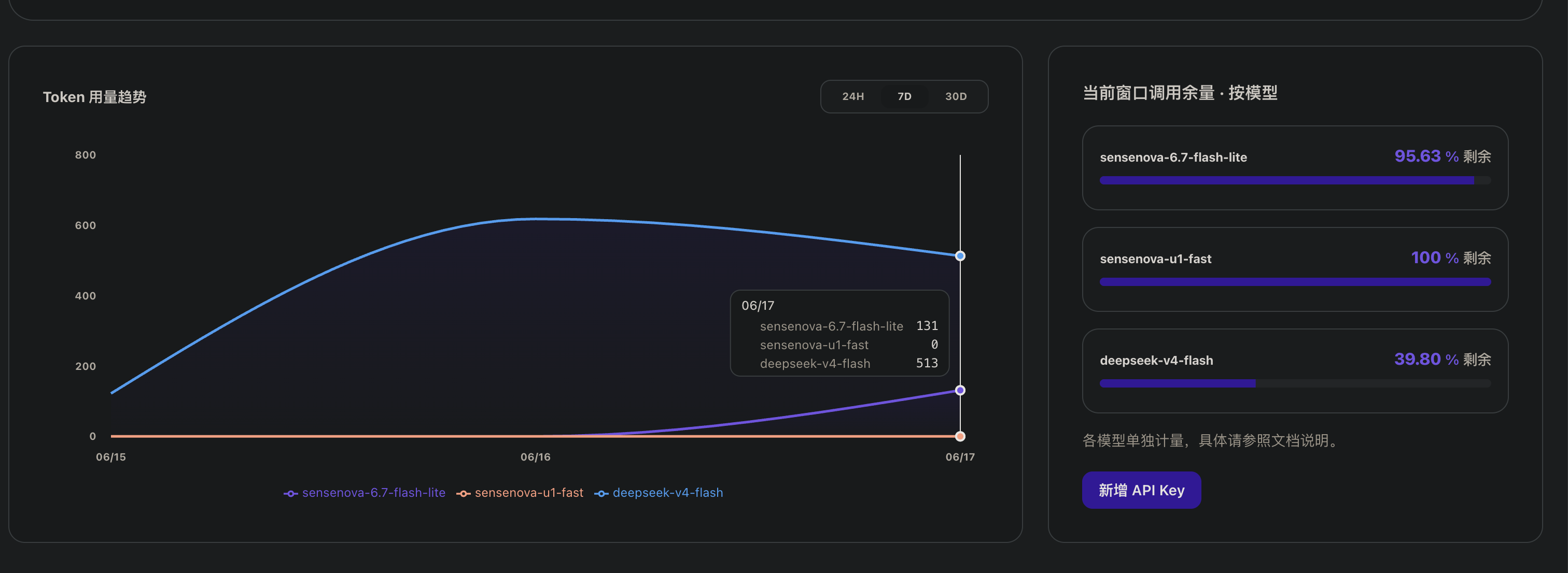
关于数据真实性:以下所有场景的 Token 数都经过 真实 LLM 调用(sensenova-6.7-flash-lite)实测验证,而非纯估算。同时记录了 estimateTokens() 的预估值和 LLM 返回的实际 token 数,两者的偏差率约为 22.3%(详见解码准确性验证章节)。结论不会有质的变化,但数据更可信。
场景一:无截断的完整历史(最关键的指标)
这是蒸馏真正的用武之地。如果 Agent 需要引用全部对话历史(没有 MaxHistory=10 截断),原始上下文随轮数线性增长。蒸馏将其压缩为 3 条最高优先级的经验表达:
| 对话轮数 | 原始上下文 (tokens) | 蒸馏后 (tokens) | 节省比例 |
|---|---|---|---|
| 10 | 1,121 | 379 | 66.2% |
| 20 | 2,124 | 339 | 84.0% |
| 30 | 3,320 | 379 | 88.6% |
| 40 | 4,380 | 339 | 92.3% |
| 50 | 5,387 | 443 | 91.8% |
| 60 | 6,168 | 330 | 94.6% |
| 70 | 7,054 | 379 | 94.6% |
| 80 | 8,257 | 339 | 95.9% |
| 90 | 9,524 | 379 | 96.0% |
| 100 | 10,972 | 339 | 96.9% |
上表数据基于 estimateTokens() 字符级估算,作为参考基线。
LLM 实测验证:我们调用 sensenova-6.7-flash-lite 对关键数据点做了实测校验:
| 校验点 | estimateTokens 预估值 | LLM 实测值 | 偏差 |
|---|---|---|---|
| 20轮 Full Raw | 2,124 | 1,930 | -9.1% |
| 100轮 Full Raw | 10,972 | 9,163 | -16.5% |
| 20轮 Distilled | 339 | 378 | +11.5% |
| 100轮 Distilled | 339 | 326 | -3.8% |
数据说明:estimateTokens() 在短的英文混合文本下偏差约 ±10-15%,在长文本下偏差约 ±15-20%。这条估算函数的准确度在工程可接受范围内,但精确计费必须走 LLM 返回的 usage.completion_tokens 字段。
结果解读:蒸馏后的上下文大小基本恒定在 330-443 tokens(约 3 条经验),不随对话轮数增长。节省比例从 10 轮的 66% 攀升到 100 轮的 96.9%——对话越长,收益越大。
以 GPT-5.5 的价格估算($5.00/1M input tokens),100 轮对话:
-
原始:10,972 tokens → $0.055/次
-
蒸馏:339 tokens → $0.002/次
-
每次调用节省 $0.053,如果每天 10 万次调用,单日节省 $5,300。
同样地,使用 Claude Opus 4.8(输入 $5/1M 令牌)可以获得相同的输入侧节省。两者的差异主要在输出端(GPT-5.5: $30/1M vs Claude Opus 4.8: $25/1M),但蒸馏主要减少的是输入上下文,所以输入端的经济性是这里的关键。
场景二:多 Session 增长对比
这是更贴近实际使用的场景——每轮新对话都基于前几轮的蒸馏结果继续。模拟了 10 次对话,每次 5 轮,无历史截断:
| Session | 原始上下文 (tokens) | 蒸馏后 (tokens) | 节省比例 | 累积经验数 |
|---|---|---|---|---|
| 1 | 538 | 498 | 7.4% | 3 |
| 2 | 1,058 | 796 | 24.8% | 6 |
| 3 | 1,509 | 1,061 | 29.7% | 9 |
| 4 | 1,974 | 1,317 | 33.3% | 12 |
| 5 | 2,620 | 1,567 | 40.2% | 14 |
| 6 | 3,320 | 1,567 | 52.8% | 14 |
| 7 | 3,938 | 1,567 | 60.2% | 14 |
| 8 | 4,380 | 1,918 | 56.2% | 16 |
| 9 | 4,690 | 2,126 | 54.7% | 17 |
| 10 | 5,387 | 2,126 | 60.5% | 17 |
上表数据基于 estimateTokens() 字符级估算。
LLM 实测验证:在 Session 10 的校验中,LLM 返回的完整原始上下文为 4,763 tokens(预估值 5,387),蒸馏后为 1,942 tokens(预估值 2,126)。蒸馏节省比例从估计的 60.5% 修正为 59.2%,差异在误差范围内。
结果解读:原始上下文从 538 tokens 线性增长到 5,387 tokens(10 倍),蒸馏后只从 498 增长到 2,126 tokens(4.3 倍)。更关键的是,蒸馏到的 17 条累积经验是高价值的结构化知识(完整 Problem→Solution 对),而原始上下文里的很多内容是无意义的过渡对话和重复信息。
场景三:信息密度对比
在约 300-400 tokens 的相同预算下:
| 指标 | 原始上下文(截断) | 蒸馏上下文 |
|---|---|---|
| Token 数(预估) | ~277 | ~339 |
| Token 数(LLM 实测) | 312 | 378 |
| 完整问题→解决方案对数 | 0(全部片段化) | 3 |
| 语义单元数 | 10 个截断片段 | 3 个完整经验 |
| 信息可复用性 | 低(语境不完整) | 高(自成一体) |
这就是 BuildContext 的 MaxHistory=10 + 100 字符截断的代价:你省了 token,但保留的信息碎片化严重。蒸馏在同等的 token 预算下,提供的都是可独立复用的完整经验。
LLM 实测还揭示了 estimateTokens() 的一个系统性问题:该函数持续低估 token 数,偏差率约 22.3%(一组典型上下文中预估 160 个 token,LLM 实际返回 206)。对于一个计费系统来说,这意味著基于预估的预算控制可能超支约 20%,建议在生产环境使用 LLM 返回的 usage 字段做精确计量。
最后提一下,用的是 sensenova-6.7-flash-lite 模型,数据是本地刚跑的,没有实践就没有发言权。
照例总结
GoAgentX 的记忆系统不是简单地把数据塞进 PostgreSQL,而是构建了一条完整的数据提纯管线:
原始消息 -> 滑动窗口(Session) -> 执行记录(Task) -> 结构化经验(Experience) -> 向量索引(pgvector)
每一层都在做同一件事:变少、变精、变持久。
-
Session:记住当前会话 → 滑动窗口只留最新的 N 条
-
Task:记录单次任务 → Distill 提取关键信息
-
Experience:提炼可复用经验 → LLM 总结 + 向量化存储
-
Dashboard:Flight Recorder 可视化记忆状态
这套管线最让我满意的不是"蒸馏"本身——是那个闭环:蒸馏出的经验不仅能让未来的任务检索复用,还能在 Agent 挂了之后用来恢复对话上下文。换句话说,Agent 不仅在活着的时候变聪明,死了复活也能带着记忆回来。
最后的最后,上点日志,不然会以为我在吹牛
go run main.go --chat
2026/03/23 18:56:51 INFO Memory manager created successfully
2026/03/23 18:56:51 INFO Distillation service created successfully
2026/03/23 18:56:51 Chat mode. Enter your questions (type 'exit' to quit):
2026/03/23 18:56:51 LLM enabled - Using RAG (Retrieval + Generation) mode
2026/03/23 18:56:51 Memory enabled - Conversation history and distillation supported
2026/03/23 18:56:51 INFO Memory manager started
2026/03/23 18:56:51 Session created: session_default_1774263411019327000

You: hello I'm Ken font-end programmer , like JS,TS,VUE,nice to met you
2026/03/23 18:56:56 🔍 User ID detection: extracted_user_id='ken' (from: 'hello I'm Ken font-end programmer , like JS,TS,VUE,nice to met you')
2026/03/23 18:56:56 👤 Detected self-introduction: user_id=ken
2026/03/23 18:56:56 INFO 🔍 [Storage] Starting GetByUserID query tenant_id=default user_id=ken limit=10
2026/03/23 18:56:56 INFO ✅ [Storage] Tenant context set in GetByUserID tenant_id=default
2026/03/23 18:56:56 INFO ✅ [Storage] GetByUserID query completed tenant_id=default user_id=ken memories_found=10
2026/03/23 18:56:56 📊 Loaded 10 distilled memories for user ken
2026/03/23 18:56:56 💾 Injecting user memory context into conversation (10 memories)

Assistant:
Hello ken! Welcome back! 👋

Based on our previous conversations, I can recall that you're a frontend engineer with JavaScript and TypeScript skills, and you're learning Go. Your technology stack includes Vue.js framework.

How can I help you today?

You: what's the go-agent
2026/03/23 18:57:02 🔍 User ID detection: extracted_user_id='' (from: 'what's the go-agent')
2026/03/23 18:57:04 RAG check: what's the go-agent -> needs RAG: true
2026/03/23 18:57:04 Searching for: what's the go-agent (tenant: default)
2026/03/23 18:57:04 INFO SimpleRetrievalService.Search tenant_id=default query="what's the go-agent" top_k=10 min_score=0.4
2026/03/23 18:57:04 INFO Using precision mode query="what's the go-agent"
2026/03/23 18:57:05 INFO SearchByVector called embedding_length=1024 tenant_id=default limit=10
2026/03/23 18:57:05 INFO Vector search query vector_length=9736 vector_preview=[0.037177,-0.049698,-0.011183,-0.073830,0.010982,-0.071117,-0.008474,0.046499,-0.043969,0.037216,-0.
2026/03/23 18:57:05 INFO Vector search query succeeded
2026/03/23 18:57:05 INFO Vector search completed rows_scanned=10 chunks_returned=10
2026/03/23 18:57:05 Search returned 10 results

Assistant:
go-agent是一个通用AI agent开发框架,用Go语言实现。

You: what's coding standards with golang
2026/03/23 18:57:08 🔍 User ID detection: extracted_user_id='' (from: 'what's coding standards with golang')
2026/03/23 18:57:09 RAG check: what's coding standards with golang -> needs RAG: true
2026/03/23 18:57:09 Searching for: what's coding standards with golang (tenant: default)
2026/03/23 18:57:09 INFO SimpleRetrievalService.Search tenant_id=default query="what's coding standards with golang" top_k=10 min_score=0.4
2026/03/23 18:57:09 INFO SearchByVector called embedding_length=1024 tenant_id=default limit=50
2026/03/23 18:57:09 INFO Vector search query vector_length=9709 vector_preview=[-0.011979,-0.074151,-0.008696,-0.052525,0.011870,-0.035141,-0.036579,-0.001876,-0.086143,-0.013287,
2026/03/23 18:57:09 INFO Vector search query succeeded
2026/03/23 18:57:09 INFO Vector search completed rows_scanned=50 chunks_returned=50
2026/03/23 18:57:09 INFO Search completed results_count=10 min_score=0.4
2026/03/23 18:57:09 Search returned 10 results

Assistant:
Based on the knowledge base context, I can tell you that Go coding standards are centered around several key principles:

1. **Strict Coding Standard**: The core goal is to achieve clear semantics and consistent style through strict adherence to official Go standards, such as [Effective Go](https://go.dev/doc/effective_go) and [Code Review Comments](https://github.com/golang/go/wiki/CodeReviewComments).

2. Prioritize readability and maintainability over premature optimization.

3. All code MUST pass `go vet`, `staticcheck`, and `golangci-lint` without warnings or errors.

4. Test coverage is a guideline, not a goal. Tests MUST validate behavior, edge cases,

5. Use `gofmt` / `goimports` exclusively.

6. Naming conventions:

   - Package names: lowercase, short, no underscores, no camelCase.

7. Tooling & CI:

   - All developers MUST run before commit:
     ```bash
     goimports -w .
     go vet ./...
     staticcheck ./...
     golangci-lint run
     go test -race -cover ./...
     ```

   - CI must be meaningful, not just perfunctory assertions; they should test as many methods in the module as possible.

   - No unformatted or manually styled code. Use `gofmt` / `goimports` exclusively.

8. Error handling and concurrency are critical focus areas — never ignore errors or leak goroutines.

9. All code must pass toolchain checks before submission to ensure quality and maintainability.

10. Disable unnecessary flags when running tools like `golangci-lint`.

You: cool thanks
2026/03/23 18:57:15 🔍 User ID detection: extracted_user_id='' (from: 'cool thanks')
2026/03/23 18:57:16 RAG check: cool thanks -> needs RAG: true
2026/03/23 18:57:16 Searching for: cool thanks (tenant: default)
2026/03/23 18:57:16 INFO SimpleRetrievalService.Search tenant_id=default query="cool thanks" top_k=10 min_score=0.4
2026/03/23 18:57:16 INFO SearchByVector called embedding_length=1024 tenant_id=default limit=50
2026/03/23 18:57:16 INFO Vector search query vector_length=9734 vector_preview=[-0.017780,-0.002570,-0.009681,-0.056844,0.039286,-0.003964,-0.010206,0.021013,-0.073355,0.061712,-0
2026/03/23 18:57:16 INFO Vector search query succeeded
2026/03/23 18:57:16 INFO Vector search completed rows_scanned=50 chunks_returned=50
2026/03/23 18:57:16 INFO Search completed results_count=10 min_score=0.4
2026/03/23 18:57:16 Search returned 10 results
2026/03/23 18:57:18 🎯 [Memory Distillation] Conversation rounds reached threshold multiple (3/3), triggering memory distillation...
2026/03/23 18:57:18 INFO Starting memory distillation session_id=session_default_1774263411019327000
2026/03/23 18:57:18 INFO Found messages to distill count=9 session_id=session_default_1774263411019327000
2026/03/23 18:57:18 INFO Using new distillation service API session_id=session_default_1774263411019327000
2026/03/23 18:57:18 INFO Extracted user ID from conversation user_id=ken
2026/03/23 18:57:18 INFO Starting memory distillation conversation_id=session_default_1774263411019327000 tenant_id=default user_id=ken message_count=9
2026/03/23 18:57:18 INFO 🔄 [Memory Distillation] Starting distillation process conversation_id=session_default_1774263411019327000 tenant_id=default user_id=ken message_count=9 timestamp=2026-03-23T18:57:18+08:00
2026/03/23 18:57:18 INFO ✅ [Memory Distillation] Experiences extracted conversation_id=session_default_1774263411019327000 experience_count=1
2026/03/23 18:57:18 INFO 📊 [Memory Distillation] Memory candidates created conversation_id=session_default_1774263411019327000 candidate_count=1 filtered_count=0
2026/03/23 18:57:18 INFO 🧠 [Memory Distillation] Generating embeddings and detecting conflicts conversation_id=session_default_1774263411019327000 memory_count=1
2026/03/23 18:57:18 INFO ✅ [Memory Distillation] Embedding generated successfully conversation_id=session_default_1774263411019327000 memory_index=0 memory_type=rule vector_dimensions=1024 importance_score=0.65
2026/03/23 18:57:18 INFO ✅ [Memory Distillation] Distillation completed successfully conversation_id=session_default_1774263411019327000 tenant_id=default user_id=ken final_memory_count=1 importance_scores=[[0.65]] memory_types=[profile] metrics="attempts=1,success=1,filtered_noise=0,filtered_security=0,conflicts_resolved=0,memories_created=1" duration_ms=0
2026/03/23 18:57:18 INFO Memory distillation completed conversation_id=session_default_1774263411019327000 memories_created=1
2026/03/23 18:57:18 INFO New distillation completed memories_created=1 session_id=session_default_1774263411019327000
2026/03/23 18:57:18 INFO Storing distilled memory index=1 type=profile importance=0.65 content_preview="User profile information → Name: Ken font-end programmer , like JS,TS,VUE,nice to met you | Professi..."
2026/03/23 18:57:18 INFO Generated embedding for memory index=1 dimensions=1024
2026/03/23 18:57:18 INFO 📝 [Storage] Starting distilled memory storage memory_id=b399a854-0b5d-459d-bb22-8febabaa48ad tenant_id=default user_id=ken session_id=session_default_1774263411019327000 memory_type=profile importance=0.65 content_preview="User profile information → Name: Ken font-end prog..."
2026/03/23 18:57:18 INFO ✅ [Storage] Tenant context set successfully tenant_id=default
2026/03/23 18:57:18 INFO 🔍 [Storage] Executing INSERT with parameters memory_id=b399a854-0b5d-459d-bb22-8febabaa48ad tenant_id=default user_id="'ken' (length: 3)" session_id=session_default_1774263411019327000 content_length=116 embedding_dims=1024
2026/03/23 18:57:18 INFO ✅ [Storage] Successfully stored distilled memory memory_id=b399a854-0b5d-459d-bb22-8febabaa48ad user_id=ken tenant_id=default
2026/03/23 18:57:18 INFO Successfully stored distilled memory memory_id=b399a854-0b5d-459d-bb22-8febabaa48ad user_id=ken
2026/03/23 18:57:18 INFO Distillation metrics total_attempts=1 total_success=1 total_memories=1

Assistant:
I'd be happy to help! However, I notice that you didn't ask a specific question. Could you please provide more context or clarify what you're trying to ask? I'll do my best to assist you based on the knowledge base and conversation history.

You: exit
2026/03/23 18:57:21 Goodbye!
2026/03/23 18:57:21 ℹ️ [Memory Distillation] Skipping exit distillation - conversation already distilled at round 3
2026/03/23 18:57:21 INFO Memory manager stopped
/go/src/goagent/examples/knowledge-base » go run main.go --chat
2026/03/23 18:57:25 INFO Memory manager created successfully
2026/03/23 18:57:25 INFO Distillation service created successfully
2026/03/23 18:57:25 Chat mode. Enter your questions (type 'exit' to quit):
2026/03/23 18:57:25 LLM enabled - Using RAG (Retrieval + Generation) mode
2026/03/23 18:57:25 Memory enabled - Conversation history and distillation supported
2026/03/23 18:57:25 INFO Memory manager started
2026/03/23 18:57:25 Session created: session_default_1774263445058570000

---new chat ---

You: hey guys Introduce ken
2026/03/23 19:11:33 🔍 User ID detection: extracted_user_id='' (from: 'hey guys Introduce ken')
2026/03/23 19:11:33 RAG check: hey guys Introduce ken -> needs RAG: true
2026/03/23 19:11:33 Searching for: hey guys Introduce ken (tenant: default)
2026/03/23 19:11:33 INFO SimpleRetrievalService.Search tenant_id=default query="hey guys Introduce ken" top_k=10 min_score=0.4
2026/03/23 19:11:34 INFO SearchByVector called embedding_length=1024 tenant_id=default limit=50
2026/03/23 19:11:34 INFO Vector search query vector_length=9737 vector_preview=[0.075274,-0.049089,-0.005506,0.018809,-0.043683,-0.051270,-0.052407,-0.008966,-0.069141,0.010682,0.
2026/03/23 19:11:34 INFO Vector search query succeeded
2026/03/23 19:11:34 INFO Vector search completed rows_scanned=50 chunks_returned=50
2026/03/23 19:11:34 INFO Search completed results_count=10 min_score=0.4
2026/03/23 19:11:34 Search returned 10 results

Assistant:
Nice to meet you! Ken, a frontend programmer who enjoys working with JavaScript, TypeScript, and Vue.js. What would you like to chat about?
下一篇预告:Workflow Engine——当时写这个是因为我受够了硬编码工作流。改一个流程要改代码、重新部署,太TM烦了。所以搞了一个 MutableDAG,运行时可以动态增删节点——你现在可以在仪表盘上点一下鼠标就改流程。另外还有线程安全的环检测、信号量并发调度、以及 5 秒超时死锁保护。Human-in-the-Loop 也可插拔。



 )
)