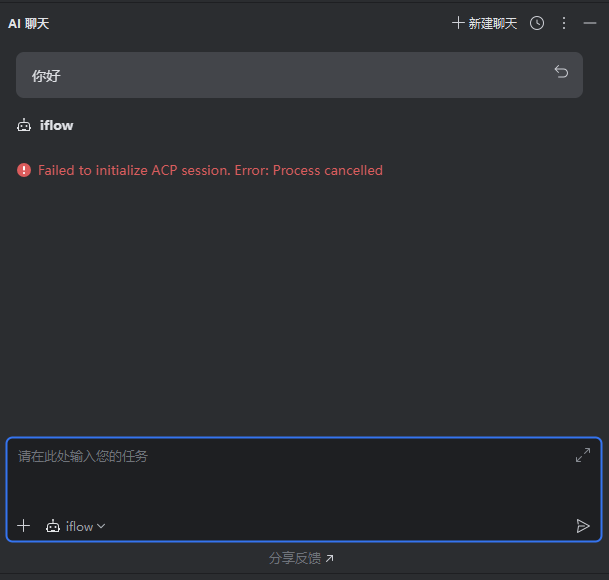
Failed to initialize ACP session. Error: Field 'modelId' is required for type with serial name 'com.agentclientprotocol.model.ModelInfo', but it was missing
Failed to initialize ACP process. Process terminated with exit code: 1. Process output:
Usage: iflow [options] [command]

iFlow CLI - Launch an interactive CLI, use -p/--prompt for non-interactive mode

Commands:
  iflow [query]     Launch iFlow CLI  [default]
  iflow mcp         Manage MCP servers
  iflow commands    Manage marketplace commands
  iflow agent       Manage agents
  iflow workflow    workflowCommand.description
  iflow skill       Manage skills

Positionals:
  query  Optional query to process (equivalent to -p for non-interactive or -i for interactive mode)  [string]

Options:
  -m, --model                           Model  [string]
  -p, --prompt                          Prompt. Appended to input on stdin (if any).  [string]
  -i, --prompt-interactive              Execute the provided prompt and continue in interactive mode  [string]
  -c, --continue                        Start the application and load the most recent conversation from current directory  [boolean] [default: false]
  -r, --resume                          Resume conversation from a specific session file. If no session ID is provided, shows interactive session selector.
  -s, --sandbox                         Run in sandbox?  [boolean]
      --sandbox-image                   Sandbox image URI.  [string]
  -d, --debug                           Run in debug mode?  [boolean] [default: false]
  -a, --all-files                       Include ALL files in context?  [boolean] [default: false]
      --all_files                       Include ALL files in context?  [deprecated: Use --all-files instead. We will be removing --all_files in the coming weeks.] [boolean] [default: false]
      --show-memory-usage               Show memory usage in status bar  [boolean] [default: false]
      --show_memory_usage               Show memory usage in status bar  [deprecated: Use --show-memory-usage instead. We will be removing --show_memory_usage in the coming weeks.] [boolean] [default: false]
  -y, --yolo                            Automatically accept all actions (aka YOLO mode, see https://www.youtube.com/watch?v=xvFZjo5PgG0 for more details)?  [boolean] [default: false]
      --default                         Use default mode (manual approval for actions)  [boolean]
      --plan                            Use plan mode (planning without execution)  [boolean]
      --thinking                        Enable thinking mode when supported by the selected model  [boolean]
      --autoEdit                        Use auto-edit mode  [boolean]
      --telemetry                       Enable telemetry? This flag specifically controls if telemetry is sent. Other --telemetry-* flags set specific values but do not enable telemetry on their own.  [boolean]
      --telemetry-target                Set the telemetry target (local or gcp). Overrides settings files.  [string] [choices: "local", "gcp"]
      --telemetry-otlp-endpoint         Set the OTLP endpoint for telemetry. Overrides environment variables and settings files.  [string]
      --telemetry-log-prompts           Enable or disable logging of user prompts for telemetry. Overrides settings files.  [boolean]
      --telemetry-outfile               Redirect all telemetry output to the specified file.  [string]
      --checkpointing                   Enables checkpointing of file edits  [boolean] [default: true]
      --experimental-acp                Starts the agent in ACP mode  [boolean]
      --stream                          Enable or disable streaming mode  [boolean]
      --port                            Port number for ACP server (used with --experimental-acp)  [number]
      --allowed-mcp-server-names        Allowed MCP server names  [array]
      --include-directories, --add-dir  Additional directories to include in the workspace (comma-separated or multiple --include-directories)  [array]
      --max-turns                       Maximum number of model calls (assistant rounds) before terminating  [number]
      --max_turns                       Maximum number of model calls (assistant rounds) before terminating  [deprecated: Use --max-turns instead. We will be removing --max_turns in the coming weeks.] [number]
      --max-tokens                      Maximum total token usage (input + output) before terminating  [number]
      --max_tokens                      Maximum total token usage (input + output) before terminating  [deprecated: Use --max-tokens instead. We will be removing --max_tokens in the coming weeks.] [number]
      --timeout                         Maximum execution time in seconds before terminating  [number]
  -o, --output-file                     Output file path to save execution information (non-interactive mode only)  [string]
      --output_file                     Output file path to save execution information (non-interactive mode only)  [deprecated: Use --output-file instead. We will be removing --output_file in the coming weeks.] [string]
  -v, --version                         Show version number  [boolean]
  -h, --help                            Show help  [boolean]


Unknown arguments: model-id, modelId
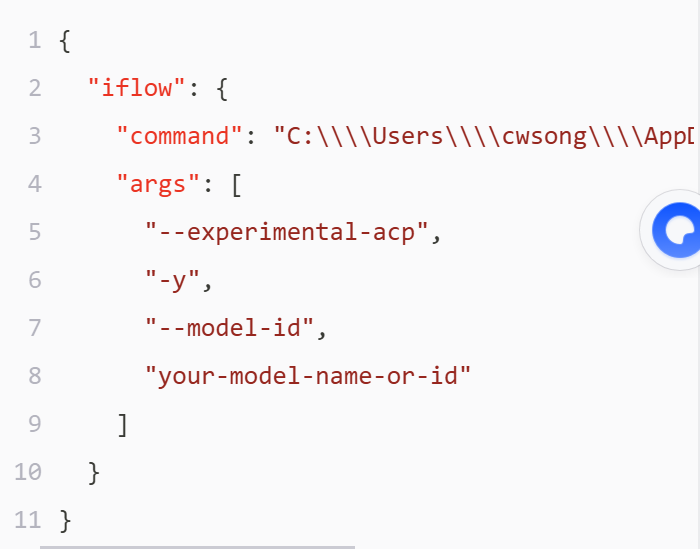
 修改步骤
修改步骤