🤖 iflow-bot:你的远程设备指挥官。Feishu | Dingding | QQ,全平台互联,一句话操控千里之外的设备。

用qq接入的时候报错是怎么回事?
:128: RuntimeWarning: ‘iflow_bot.cli.commands’ found in sys.modules after import of package ‘iflow_bot.cli’, but prior to execution of ‘iflow_bot.cli.commands’; this may result in unpredictable behaviour

启动 ACP 服务 (端口: 8090)…

ACP 服务已在运行 (端口 8090),复用现有进程

✓ 复用现有 ACP 服务 (端口: 8090)

2026-02-26 13:35:40.804 | INFO | iflow_bot.engine.adapter:_init_:137 - IFlowAdapter: mode=acp, workspace=/home/ch/.iflow-bot/workspace, model=glm-5, thinking=False

2026-02-26 13:35:40.804 | INFO | iflow_bot.engine.loop:_init_:71 - AgentLoop initialized with model=glm-5, workspace=/home/ch/.iflow-bot/workspace, streaming=True

Gateway 启动中…

2026-02-26 13:35:40.804 | INFO | iflow_bot.cron.service:_load_store:157 - Loaded 0 cron jobs from storage

2026-02-26 13:35:40.804 | INFO | iflow_bot.cron.service:start:189 - Cron service started with 0 jobs

2026-02-26 13:35:40.805 | INFO | iflow_bot.heartbeat.service:start:106 - Heartbeat service started (interval: 1800s)

2026-02-26 13:35:40.805 | DEBUG | iflow_bot.cron.service:watch_file:210 - Cron: detected file change, reloading…

2026-02-26 13:35:40.805 | INFO | iflow_bot.cron.service:_load_store:157 - Loaded 0 cron jobs from storage

e[1;33m[INFO] (client.py:162)_bot_login e[0m[botpy] 登录机器人账号中…

e[1;33m[INFO] (robot.py:65)update_access_token e[0m[botpy] access_token expires_in 2522

e[1;33m[INFO] (client.py:181)_bot_init e[0m[botpy] 程序启动…

e[1;33m[INFO] (connection.py:60)multi_run e[0m[botpy] 最大并发连接数: 1, 启动会话数: 1

e[1;33m[INFO] (client.py:242)bot_connect e[0m[botpy] 会话启动中…

e[1;33m[INFO] (gateway.py:115)ws_connect e[0m[botpy] 启动中…

e[1;33m[INFO] (gateway.py:142)ws_identify e[0m[botpy] 鉴权中…

e[1;33m[INFO] (gateway.py:85)on_message e[0m[botpy] 机器人「橘雪莉-测试中」启动成功!

e[1;33m[INFO] (gateway.py:223)_send_heart e[0m[botpy] 心跳维持启动…

2026-02-26 13:35:41.806 | INFO | iflow_bot.engine.loop:start_background:416 - AgentLoop started in background

✓ Gateway 运行中!

渠道: qq

心跳: 每 30 分钟

模式: ACP

按 Ctrl+C 停止

2026-02-26 13:35:41.807 | INFO | iflow_bot.engine.loop:run:174 - AgentLoop started, listening for inbound messages…

2026-02-26 13:35:51.809 | DEBUG | iflow_bot.bus.queue:publish_inbound:59 - Published inbound message from qq:06D83942274621AA0239D56878D96275

2026-02-26 13:35:51.809 | INFO | iflow_bot.engine.loop:_process_message:190 - Processing: qq:06D83942274621AA0239D56878D96275

2026-02-26 13:35:51.809 | INFO | iflow_bot.engine.loop:_get_bootstrap_content:87 - BOOTSTRAP.md detected - will inject bootstrap instructions

2026-02-26 13:35:51.809 | INFO | iflow_bot.engine.loop:_process_message:218 - Injected BOOTSTRAP for qq:06D83942274621AA0239D56878D96275

2026-02-26 13:35:51.810 | INFO | iflow_bot.engine.acp:_init_:700 - ACPAdapter: host=localhost, port=8090, workspace=/home/ch/.iflow-bot/workspace

2026-02-26 13:35:51.810 | INFO | iflow_bot.engine.acp:_init_:168 - ACPClient initialized: ws://localhost:8090/acp

2026-02-26 13:35:51.841 | ERROR | iflow_bot.engine.loop:_process_message:246 - Error processing message: Failed to connect to ACP server: server rejected WebSocket connection: HTTP 404

2026-02-26 13:35:51.841 | DEBUG | iflow_bot.bus.queue:publish_outbound:93 - Published outbound message to qq:06D83942274621AA0239D56878D96275

之前的问题解决了,现在是这个日志,没ERROR但是qq收不到消息

:128: RuntimeWarning: ‘iflow_bot.cli.commands’ found in sys.modules after import of package ‘iflow_bot.cli’, but prior to execution of ‘iflow_bot.cli.commands’; this may result in unpredictable behaviour

启动 ACP 服务 (端口: 18999)…

ACP 服务已在运行 (端口 18999),复用现有进程

✓ 复用现有 ACP 服务 (端口: 18999)

2026-02-26 13:48:57.836 | INFO | iflow_bot.engine.adapter:_init_:137 - IFlowAdapter: mode=acp, workspace=/home/ch/.iflow-bot/workspace, model=kimi-k2.5, thinking=False

2026-02-26 13:48:57.836 | INFO | iflow_bot.engine.loop:_init_:71 - AgentLoop initialized with model=kimi-k2.5, workspace=/home/ch/.iflow-bot/workspace, streaming=True

Gateway 启动中…

2026-02-26 13:48:57.837 | INFO | iflow_bot.cron.service:_load_store:157 - Loaded 0 cron jobs from storage

2026-02-26 13:48:57.837 | INFO | iflow_bot.cron.service:start:189 - Cron service started with 0 jobs

2026-02-26 13:48:57.837 | INFO | iflow_bot.heartbeat.service:start:106 - Heartbeat service started (interval: 1800s)

2026-02-26 13:48:57.837 | DEBUG | iflow_bot.cron.service:watch_file:210 - Cron: detected file change, reloading…

2026-02-26 13:48:57.837 | INFO | iflow_bot.cron.service:_load_store:157 - Loaded 0 cron jobs from storage

e[1;33m[INFO] (client.py:162)_bot_login e[0m[botpy] 登录机器人账号中…

e[1;33m[INFO] (robot.py:65)update_access_token e[0m[botpy] access_token expires_in 1725

e[1;33m[INFO] (client.py:181)_bot_init e[0m[botpy] 程序启动…

e[1;33m[INFO] (connection.py:60)multi_run e[0m[botpy] 最大并发连接数: 1, 启动会话数: 1

e[1;33m[INFO] (client.py:242)bot_connect e[0m[botpy] 会话启动中…

e[1;33m[INFO] (gateway.py:115)ws_connect e[0m[botpy] 启动中…

e[1;33m[INFO] (gateway.py:142)ws_identify e[0m[botpy] 鉴权中…

e[1;33m[INFO] (gateway.py:85)on_message e[0m[botpy] 机器人「橘雪莉-测试中」启动成功!

e[1;33m[INFO] (gateway.py:223)_send_heart e[0m[botpy] 心跳维持启动…

2026-02-26 13:48:58.838 | INFO | iflow_bot.engine.loop:start_background:416 - AgentLoop started in background

✓ Gateway 运行中!

渠道: qq

心跳: 每 30 分钟

模式: ACP

按 Ctrl+C 停止

2026-02-26 13:48:58.840 | INFO | iflow_bot.engine.loop:run:174 - AgentLoop started, listening for inbound messages…

2026-02-26 13:49:13.899 | DEBUG | iflow_bot.bus.queue:publish_inbound:59 - Published inbound message from qq:06D83942274621AA0239D56878D96275

2026-02-26 13:49:13.899 | INFO | iflow_bot.engine.loop:_process_message:190 - Processing: qq:06D83942274621AA0239D56878D96275

2026-02-26 13:49:13.899 | INFO | iflow_bot.engine.loop:_get_bootstrap_content:87 - BOOTSTRAP.md detected - will inject bootstrap instructions

2026-02-26 13:49:13.899 | INFO | iflow_bot.engine.loop:_process_message:218 - Injected BOOTSTRAP for qq:06D83942274621AA0239D56878D96275

2026-02-26 13:49:13.899 | INFO | iflow_bot.engine.acp:_init_:700 - ACPAdapter: host=localhost, port=18999, workspace=/home/ch/.iflow-bot/workspace

2026-02-26 13:49:13.900 | INFO | iflow_bot.engine.acp:_init_:168 - ACPClient initialized: ws://localhost:18999/acp

2026-02-26 13:49:13.901 | INFO | iflow_bot.engine.acp:connect:193 - ACP connected to ws://localhost:18999/acp

2026-02-26 13:49:15.944 | DEBUG | iflow_bot.engine.acp:_receive_loop:231 - ACP non-JSON message: //ready

2026-02-26 13:49:15.944 | DEBUG | iflow_bot.engine.acp:_receive_loop:231 - ACP non-JSON message: //stderr [WS 2] Embedded iFlow ACP peer started

2026-02-26 13:49:16.903 | DEBUG | iflow_bot.engine.acp:_send_request:306 - ACP request: initialize (id=1)

2026-02-26 13:49:16.904 | INFO | iflow_bot.engine.acp:initialize:348 - ACP initialized: version=1, capabilities=[‘loadSession’, ‘promptCapabilities’]

2026-02-26 13:49:16.905 | DEBUG | iflow_bot.engine.acp:_send_request:306 - ACP request: authenticate (id=2)

PS C:\Users\11273> iflow-bot gateway start

/$$ /$$$$$$$$ /$$ /$$$$$$$ /$$
|/| $$/| $$ | $$*** $$ | $$
/$$| $$ | $$ /$$$$$$ /$$ /$$ /$$ | $$ \ $$ /$$$$$$ /$$$$$$
| $$| $$$$$ | $$ /$$_ $$| $$ | $$ | $$ /$$$$$$| $$$$$$$ /$$__ $$|_ $$/
| $$| $$
/ | $$| $$ \ $$| $$ | $$ | $$|/| $$** $$| $$ \ $$ | $$
| $$| $$ | $$| $$ | $$| $$ | $$ | $$ | $$ \ $$| $$ | $$ | $$ /$$
| $$| $$ | $$| $$$$$$/| $$$$$/$$$$/ | $$$$$$$/| $$$$$$/ | $$$$/
|/|/ |/ _/ _____/_/ |_______/ __/ _*/

Multi-channel AI Assistant (powered by iflow)

iflow 未安装,正在自动安装…

自动安装依赖中…
‘bash’ 不是内部或外部命令,也不是可运行的程序
或批处理文件。
自动安装失败,请手动执行以下命令:
bash -c “$(curl -fsSL https://gitee.com/iflow-ai/iflow-cli/raw/main/install.sh)” window安装启动失败

ok,收到:saluting_face:

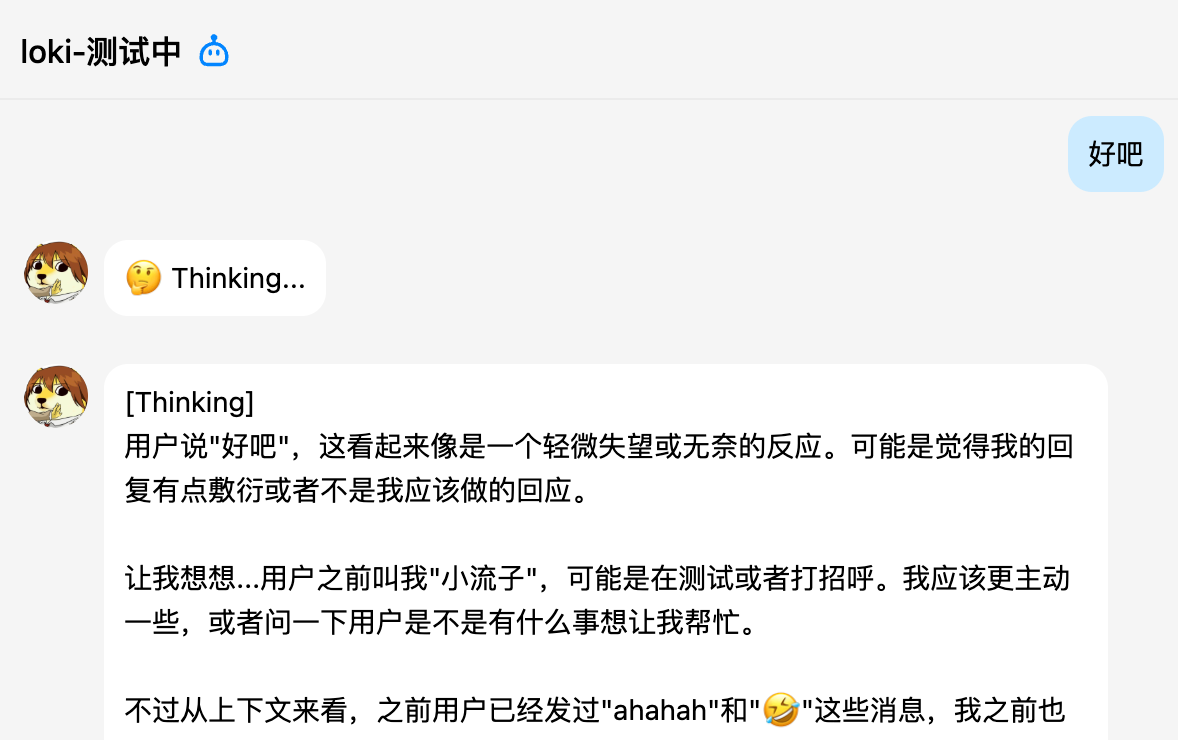
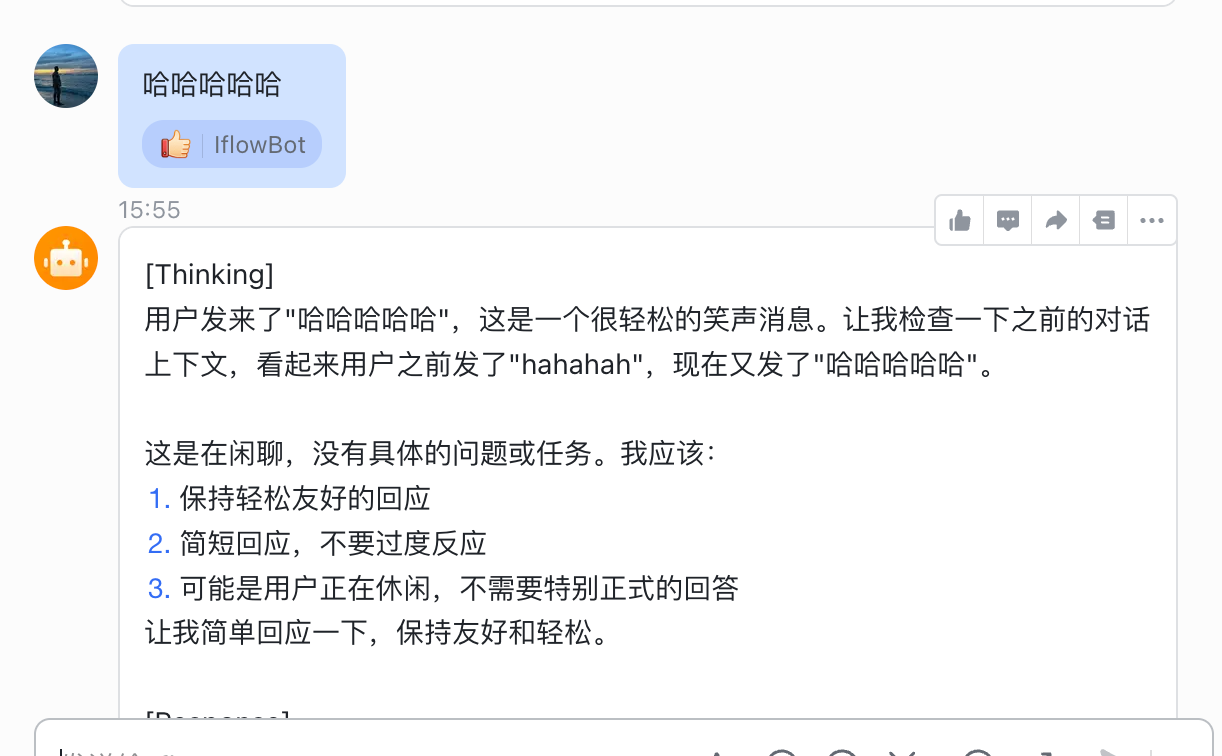
收到,我看看,优化了一下,因为QQ是非流式传输,所以首次启动的时候,上下文太长会比较慢,所以容易误以为是机器人没响应。

优化后,发送消息,如果机器人收到,会先发送一个“Thinking…”
效果如图:

2 个赞

我看到有说升级的我也升级了 之后用npm 的方式执行安装cli 之后还是不行 我的iflow是可以正常使用的

这么奇怪。可惜身边没有windows,这个问题我没办法复现。你看看能不能先用wsl跑。或者你在终端直接执行iflow,看看报不报错。

1 个赞

过于优秀,过年期间刚好跟open claw聊过这个情况,晚上让他继续开发一下,互相学习~

1 个赞

作者辛苦了。不过目前飞书bot的配置存在问题,无法配置长连接。flow-bot 主进程运行在 asyncio 事件循环中,而飞书 SDK 的 lark.ws.Client 在独立线程中尝试创建/使用事件循环时,与主事件循环产生冲突。可以再多多测试验证下

1 个赞

好的,我看看啥情况,理论上应该是没问题的。

欢迎大家反馈问题,目前该项目积极维护中。

一、问题描述

1.1 问题现象

在 VPS 环境部署 iflow-bot 并配置飞书渠道时,服务启动后 WebSocket 长连接无法建立,持续报错:

[Lark] [ERROR] connect failed, err: This event loop is already running
Feishu WebSocket error: This event loop is already running
RuntimeWarning: coroutine 'Client._disconnect' was never awaited
RuntimeWarning: coroutine 'Client._connect' was never awaited

飞书开放平台显示:“应用未建立长连接”

1.2 环境信息

项目 版本/配置
操作系统 Ubuntu 24.04.2 LTS
Python 3.12.3
iflow-bot v0.1.5
lark-oapi 1.4.x
Node.js v24.14.0
iflow CLI v0.5.14

二、问题根因分析

2.1 技术架构

iflow-bot 的飞书渠道实现架构:

iflow-bot (主进程)
    ├── asyncio 事件循环 (主循环)
    │   ├── AgentLoop
    │   ├── CronService
    │   └── HeartbeatService
    │
    └── FeishuChannel (飞书渠道)
        ├── asyncio.get_running_loop() ← 获取主事件循环
        └── threading.Thread(run_ws) ← 创建独立线程
            └── ws_client.start() ← lark-oapi WebSocket 客户端

2.2 根本原因

lark-oapi SDK 的 WebSocket 客户端设计问题

SDK 在模块加载时就获取了全局事件循环:

# lark_oapi/ws/client.py 模块级别代码
try:
    loop = asyncio.get_event_loop()
except RuntimeError:
    loop = asyncio.new_event_loop()
    asyncio.set_event_loop(loop)

然后 start() 方法使用这个全局 loop 调用 run_until_complete()

def start(self) -> None:
    try:
        loop.run_until_complete(self._connect())
    # ...

问题:当 iflow-bot 主进程已运行 asyncio 事件循环时:

  1. asyncio.get_running_loop() 返回主事件循环
  2. SDK 的 start() 方法在独立线程中调用 loop.run_until_complete()
  3. 由于主事件循环已在运行,产生 RuntimeError: This event loop is already running

三、解决方案

3.1 修改 lark-oapi SDK 的 client.py

修改位置: lark_oapi/ws/client.py

修改内容:使 SDK 在调用时动态获取当前线程的事件循环,而非使用模块级别的全局事件循环。

步骤 1:备份原始文件

cp /path/to/lark_oapi/ws/client.py /path/to/lark_oapi/ws/client.py.bak

步骤 2:修改模块级事件循环代码

原始代码

try:
    loop = asyncio.get_event_loop()
except RuntimeError:
    loop = asyncio.new_event_loop()
    asyncio.set_event_loop(loop)

修改为

# 不在模块级别获取事件循环,改为在 start() 方法中获取
# 这样可以支持在独立线程中运行
_loop = None

步骤 3:修改 start() 方法

原始代码

def start(self) -> None:
    try:
        loop.run_until_complete(self._connect())

修改为

def start(self) -> None:
    # 在调用时获取当前线程的事件循环
    try:
        current_loop = asyncio.get_running_loop()
    except RuntimeError:
        current_loop = asyncio.new_event_loop()
        asyncio.set_event_loop(current_loop)
    
    try:
        current_loop.run_until_complete(self._connect())

步骤 4:修改其他 loop 引用

将文件中所有 loop. 引用改为 current_loop.asyncio.get_event_loop().

# 原始
loop.run_until_complete(self._disconnect())
loop.run_until_complete(self._reconnect())
loop.create_task(self._ping_loop())

# 修改为
current_loop.run_until_complete(self._disconnect())
current_loop.run_until_complete(self._reconnect())
asyncio.get_event_loop().create_task(self._ping_loop())

3.2 完整补丁脚本

#!/usr/bin/env python3
"""
lark-oapi WebSocket 客户端补丁脚本
修复 asyncio 事件循环冲突问题
"""

import sys

def patch_lark_oapi():
    file_path = None
    
    # 查找 lark_oapi 安装路径
    import lark_oapi
    package_path = lark_oapi.__path__[0]
    file_path = f"{package_path}/ws/client.py"
    
    if not file_path:
        print("ERROR: Cannot find lark_oapi/ws/client.py")
        return False
    
    with open(file_path, 'r') as f:
        content = f.read()
    
    # 备份
    with open(f"{file_path}.bak", 'w') as f:
        f.write(content)
    
    # 修改 1: 模块级事件循环
    old_loop_code = '''try:
    loop = asyncio.get_event_loop()
except RuntimeError:
    loop = asyncio.new_event_loop()
    asyncio.set_event_loop(loop)'''
    
    new_loop_code = '''# 不在模块级别获取事件循环,改为在 start() 方法中获取
# 这样可以支持在独立线程中运行
_loop = None'''
    
    if old_loop_code in content:
        content = content.replace(old_loop_code, new_loop_code)
        print("Step 1: Module-level loop code modified")
    
    # 修改 2: start() 方法
    old_start = '''    def start(self) -> None:
        try:
            loop.run_until_complete(self._connect())'''
    
    new_start = '''    def start(self) -> None:
        # 在调用时获取当前线程的事件循环
        try:
            current_loop = asyncio.get_running_loop()
        except RuntimeError:
            current_loop = asyncio.new_event_loop()
            asyncio.set_event_loop(current_loop)
        
        try:
            current_loop.run_until_complete(self._connect())'''
    
    if old_start in content:
        content = content.replace(old_start, new_start)
        print("Step 2: start() method modified")
    
    # 修改 3: 其他 loop 引用
    content = content.replace("loop.run_until_complete(self._disconnect())", 
                              "current_loop.run_until_complete(self._disconnect())")
    content = content.replace("loop.run_until_complete(self._reconnect())", 
                              "current_loop.run_until_complete(self._reconnect())")
    content = content.replace("loop.create_task(self._ping_loop())", 
                              "asyncio.get_event_loop().create_task(self._ping_loop())")
    content = content.replace("loop.create_task(self._receive_message_loop())", 
                              "asyncio.get_event_loop().create_task(self._receive_message_loop())")
    content = content.replace("loop.create_task(self._handle_message(msg))", 
                              "asyncio.get_event_loop().create_task(self._handle_message(msg))")
    
    with open(file_path, 'w') as f:
        f.write(content)
    
    print("Patch applied successfully!")
    return True

if __name__ == "__main__":
    patch_lark_oapi()

四、验证结果

4.1 修复前

[Lark] [ERROR] connect failed, err: This event loop is already running
Feishu WebSocket error: This event loop is already running

4.2 修复后

启动渠道网关: feishu
[Lark] [INFO] WebSocket connected successfully

服务正常运行,无事件循环冲突错误。

2 个赞
import lark_oapi.ws.client as ws_client_module

   # 创建新的事件循环并替换模块变量

   new_loop = asyncio.new_event_loop()

   asyncio.set_event_loop(new_loop)

   ws_client_module.loop = new_loop  # 替换模块内部的 loop 变量

我直接在主循环中替换一下吧。这样不动lark_oapi源码。

修复了。

1 个赞

作者大大,更新了还是不行哎

也是windows?

你好,我的qq机器人在输出完 thinking后,下一个就是 处理消息时出错xxxxxxx

ERROR | iflow_bot.engine.loop:_process_message:246 - Error processing message: Failed to connect to ACP server: did not receive a valid HTTP response

那可能是PATH设置有问题,你用重新登录后用 which iflow 能找到 iflow 吗?

1 个赞

是不是iflow cli没登录?

iflow 未安装,正在自动安装…

自动安装依赖中…
npm warn deprecated phin@3.7.1: Package no longer supported. Contact Support at https://www.npmjs.com/support for more info.
npm warn deprecated har-validator@5.1.5: this library is no longer supported
npm warn deprecated uuid@3.4.0: Please upgrade to version 7 or higher. Older versions may use Math.random() in certain circumstances, which is known to be problematic. See https://v8.dev/blog/math-random for details.
npm warn deprecated request@2.88.2: request has been deprecated, see https://github.com/request/request/issues/3142

added 5 packages, and changed 229 packages in 10s

42 packages are looking for funding
run npm fund for details
安装后仍检测不到 iflow,请检查安装过程

回消息好慢,有时候还会超时,能不能优化下